

今、ある案件のコンサルティングでReactNative GoogleMapとCarousel連動するアニメーションの実現する必要が出ています。
今日はその方法を解説していきたいと思います。
すみません、ビデオをちゃんと撮ると思って、数分前のツイートを消しました。
出来ました!Carouselとgoogle maps makerのアニメーション連動! #ReactNative pic.twitter.com/Lo0ZAwsZQA— 川島@ソフトウェア、Web、アプリ、IoT作るのが大好き (@kokensha_tech) 2018年8月5日
シミュレータからとってみました! pic.twitter.com/AALIdGZx33
— 川島@ソフトウェア、Web、アプリ、IoT作るのが大好き (@kokensha_tech) 2018年8月5日
#ReactNative 今度は、実機で実際に動かしてみましたが
動作はサクサクでとてもレスポンシブですが
なぜか、カードの間がシミュレーターと違って、密集していますね!
シミュレーターと実機のこの差異は何だろうな react nativeの問題なのか、シミュレーターの問題なのか、今断定出来ませんが。。。 pic.twitter.com/HasLXD7t4y— 川島@ソフトウェア、Web、アプリ、IoT作るのが大好き (@kokensha_tech) 2018年8月5日
プログラムの修正
今回はこちらのソースコードを少し改造した
https://github.com/browniefed/map_animated_scrollview
その上、下記のライブラリーを使用することにします。
https://github.com/archriss/react-native-snap-carousel

修正まえのプログラム(Before)
import React, { Component } from "react";
import {
  AppRegistry,
  StyleSheet,
  Text,
  View,
  ScrollView,
  Animated,
  Image,
  Dimensions,
  TouchableOpacity,
} from "react-native";

import MapView from "react-native-maps";

const Images = [
  { uri: "https://i.imgur.com/sNam9iJ.jpg" },
  { uri: "https://i.imgur.com/N7rlQYt.jpg" },
  { uri: "https://i.imgur.com/UDrH0wm.jpg" },
  { uri: "https://i.imgur.com/Ka8kNST.jpg" }
]

const { width, height } = Dimensions.get("window");

const CARD_HEIGHT = height / 4;
const CARD_WIDTH = CARD_HEIGHT - 50;

export default class screens extends Component {
  state = {
    markers: [
      {
        coordinate: {
          latitude: 45.524548,
          longitude: -122.6749817,
        },
        title: "Best Place",
        description: "This is the best place in Portland",
        image: Images[0],
      },
      {
        coordinate: {
          latitude: 45.524698,
          longitude: -122.6655507,
        },
        title: "Second Best Place",
        description: "This is the second best place in Portland",
        image: Images[1],
      },
      {
        coordinate: {
          latitude: 45.5230786,
          longitude: -122.6701034,
        },
        title: "Third Best Place",
        description: "This is the third best place in Portland",
        image: Images[2],
      },
      {
        coordinate: {
          latitude: 45.521016,
          longitude: -122.6561917,
        },
        title: "Fourth Best Place",
        description: "This is the fourth best place in Portland",
        image: Images[3],
      },
    ],
    region: {
      latitude: 45.52220671242907,
      longitude: -122.6653281029795,
      latitudeDelta: 0.04864195044303443,
      longitudeDelta: 0.040142817690068,
    },
  };

  componentWillMount() {
    this.index = 0;
    this.animation = new Animated.Value(0);
  }
  componentDidMount() {
    // We should detect when scrolling has stopped then animate
    // We should just debounce the event listener here
    this.animation.addListener(({ value }) => {
      let index = Math.floor(value / CARD_WIDTH + 0.3); // animate 30% away from landing on the next item
      if (index >= this.state.markers.length) {
        index = this.state.markers.length - 1;
      }
      if (index <= 0) {
        index = 0;
      }

      clearTimeout(this.regionTimeout);
      this.regionTimeout = setTimeout(() => {
        if (this.index !== index) {
          this.index = index;
          const { coordinate } = this.state.markers[index];
          this.map.animateToRegion(
            {
              ...coordinate,
              latitudeDelta: this.state.region.latitudeDelta,
              longitudeDelta: this.state.region.longitudeDelta,
            },
            350
          );
        }
      }, 10);
    });
  }

  render() {
    const interpolations = this.state.markers.map((marker, index) => {
      const inputRange = [
        (index - 1) * CARD_WIDTH,
        index * CARD_WIDTH,
        ((index + 1) * CARD_WIDTH),
      ];
      const scale = this.animation.interpolate({
        inputRange,
        outputRange: [1, 2.5, 1],
        extrapolate: "clamp",
      });
      const opacity = this.animation.interpolate({
        inputRange,
        outputRange: [0.35, 1, 0.35],
        extrapolate: "clamp",
      });
      return { scale, opacity };
    });

    return (
      <View style={styles.container}>
        <MapView
          ref={map => this.map = map}
          initialRegion={this.state.region}
          style={styles.container}
        >
          {this.state.markers.map((marker, index) => {
            const scaleStyle = {
              transform: [
                {
                  scale: interpolations[index].scale,
                },
              ],
            };
            const opacityStyle = {
              opacity: interpolations[index].opacity,
            };
            return (
              <MapView.Marker key={index} coordinate={marker.coordinate}>
                <Animated.View style={[styles.markerWrap, opacityStyle]}>
                  <Animated.View style={[styles.ring, scaleStyle]} />
                  <View style={styles.marker} />
                </Animated.View>
              </MapView.Marker>
            );
          })}
        </MapView>
        <Animated.ScrollView
          horizontal
          scrollEventThrottle={1}
          showsHorizontalScrollIndicator={false}
          snapToInterval={CARD_WIDTH}
          onScroll={Animated.event(
            [
              {
                nativeEvent: {
                  contentOffset: {
                    x: this.animation,
                  },
                },
              },
            ],
            { useNativeDriver: true }
          )}
          style={styles.scrollView}
          contentContainerStyle={styles.endPadding}
        >
          {this.state.markers.map((marker, index) => (
            <View style={styles.card} key={index}>
              <Image
                source={marker.image}
                style={styles.cardImage}
                resizeMode="cover"
              />
              <View style={styles.textContent}>
                <Text numberOfLines={1} style={styles.cardtitle}>{marker.title}</Text>
                <Text numberOfLines={1} style={styles.cardDescription}>
                  {marker.description}
                </Text>
              </View>
            </View>
          ))}
        </Animated.ScrollView>
      </View>
    );
  }
}

const styles = StyleSheet.create({
  container: {
    flex: 1,
  },
  scrollView: {
    position: "absolute",
    bottom: 30,
    left: 0,
    right: 0,
    paddingVertical: 10,
  },
  endPadding: {
    paddingRight: width - CARD_WIDTH,
  },
  card: {
    padding: 10,
    elevation: 2,
    backgroundColor: "#FFF",
    marginHorizontal: 10,
    shadowColor: "#000",
    shadowRadius: 5,
    shadowOpacity: 0.3,
    shadowOffset: { x: 2, y: -2 },
    height: CARD_HEIGHT,
    width: CARD_WIDTH,
    overflow: "hidden",
  },
  cardImage: {
    flex: 3,
    width: "100%",
    height: "100%",
    alignSelf: "center",
  },
  textContent: {
    flex: 1,
  },
  cardtitle: {
    fontSize: 12,
    marginTop: 5,
    fontWeight: "bold",
  },
  cardDescription: {
    fontSize: 12,
    color: "#444",
  },
  markerWrap: {
    alignItems: "center",
    justifyContent: "center",
  },
  marker: {
    width: 8,
    height: 8,
    borderRadius: 4,
    backgroundColor: "rgba(130,4,150, 0.9)",
  },
  ring: {
    width: 24,
    height: 24,
    borderRadius: 12,
    backgroundColor: "rgba(130,4,150, 0.3)",
    position: "absolute",
    borderWidth: 1,
    borderColor: "rgba(130,4,150, 0.5)",
  },
});

AppRegistry.registerComponent("mapfocus", () => screens);
修正後のプログラム(After)
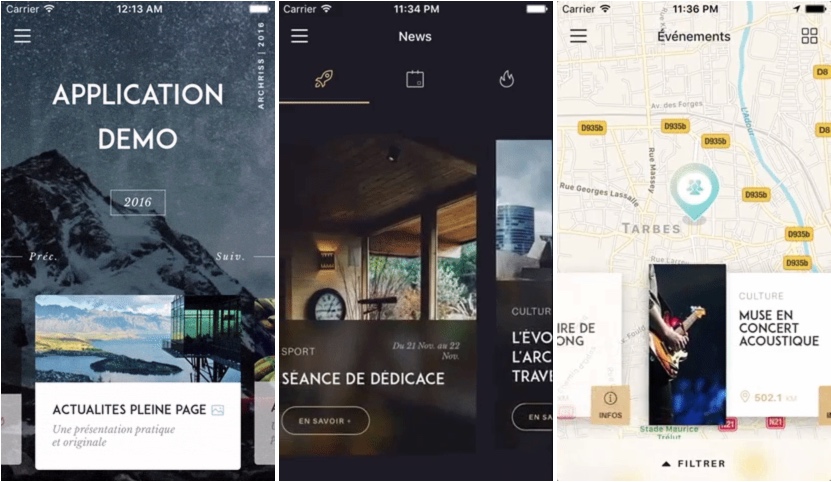
こんなイメージで実現したいですね。
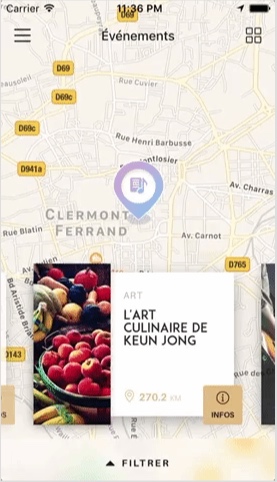

こちらとなります!
Imageは、https://github.com/browniefed/map_animated_scrollview のものそのまま利用します。
import React, { Component } from "react";
import {
  AppRegistry,
  StyleSheet,
  Text,
  View,
  ScrollView,
  Animated,
  Image,
  Dimensions,
  TouchableOpacity,
} from "react-native";
import Carousel from 'react-native-snap-carousel';
import MapView from "react-native-maps";
const Images = [
  { uri: "https://i.imgur.com/sNam9iJ.jpg" },
  { uri: "https://i.imgur.com/N7rlQYt.jpg" },
  { uri: "https://i.imgur.com/UDrH0wm.jpg" },
  { uri: "https://i.imgur.com/Ka8kNST.jpg" }
]
const { width, height } = Dimensions.get("window");
const CARD_HEIGHT = height / 4;
const CARD_WIDTH = CARD_HEIGHT - 50;
export default class screens extends Component {
  state = {
    scrolledX: 0,
    markers: [
      {
        coordinate: {
          latitude: 45.524548,
          longitude: -122.6749817,
        },
        title: "Best Place",
        description: "This is the best place in Portland",
        image: Images[0],
      },
      {
        coordinate: {
          latitude: 45.524698,
          longitude: -122.6655507,
        },
        title: "Second Best Place",
        description: "This is the second best place in Portland",
        image: Images[1],
      },
      {
        coordinate: {
          latitude: 45.5230786,
          longitude: -122.6701034,
        },
        title: "Third Best Place",
        description: "This is the third best place in Portland",
        image: Images[2],
      },
      {
        coordinate: {
          latitude: 45.521016,
          longitude: -122.6561917,
        },
        title: "Fourth Best Place",
        description: "This is the fourth best place in Portland",
        image: Images[3],
      },
    ],
    region: {
      latitude: 45.52220671242907,
      longitude: -122.6653281029795,
      latitudeDelta: 0.04864195044303443,
      longitudeDelta: 0.040142817690068,
    },
  };
  componentWillMount() {
    this.index = 0;
    this.animation = new Animated.Value(0);
  }
  componentDidMount() {
    // We should detect when scrolling has stopped then animate
    // We should just debounce the event listener here
    this.animation.addListener(({ value }) => {
      let index = Math.floor(value / CARD_WIDTH + 0.3); // animate 30% away from landing on the next item
      if(index >= this.state.markers.length) {
        index = this.state.markers.length - 1;
      }
      if(index <= 0) {
        index = 0;
      }
      clearTimeout(this.regionTimeout);
      this.regionTimeout = setTimeout(() => {
        if(this.index !== index) {
          this.index = index;
          const { coordinate } = this.state.markers[index];
          this.map.animateToRegion({ ...coordinate,
            latitudeDelta: this.state.region.latitudeDelta,
            longitudeDelta: this.state.region.longitudeDelta,
          }, 350);
        }
      }, 10);
    });
  }
  _renderItem({ item, index }) {
    return(<View
              style={styles.card} key={index}>
            <Image
              source={item.image}
              style={styles.cardImage}
              resizeMode="cover"
            />
            <View style={styles.textContent}>
              <Text numberOfLines={1} style={styles.cardtitle}>{item.title}</Text>
              <Text numberOfLines={1} style={styles.cardDescription}>
                {item.description}
              </Text>
            </View>
          </View>);
  }
  render() {
    const interpolations = this.state.markers.map((marker, index) => {
      const inputRange = [
        (index - 1) * CARD_WIDTH,
        index * CARD_WIDTH,
        ((index + 1) * CARD_WIDTH),
      ];
      const scale = this.animation.interpolate({
        inputRange,
        outputRange: [1, 2.5, 1],
        extrapolate: "clamp",
      });
      const opacity = this.animation.interpolate({
        inputRange,
        outputRange: [0.35, 1, 0.35],
        extrapolate: "clamp",
      });
      return { scale, opacity };
    });
    return(<View style={styles.container}>
        <MapView
          ref={map => this.map = map}
          initialRegion={this.state.region}
          style={styles.container}
        >
          {this.state.markers.map((marker, index) => {
            const scaleStyle = {
              transform: [
                {
                  scale: interpolations[index].scale,
                },
              ],
            };
            const opacityStyle = {
              opacity: interpolations[index].opacity,
            };
            return (
              <MapView.Marker key={index} coordinate={marker.coordinate}>
                <Animated.View style={[styles.markerWrap, opacityStyle]}>
                  <Animated.View style={[styles.ring, scaleStyle]} />
                  <View style={styles.marker} />
                </Animated.View>
              </MapView.Marker>
            );
          })}
        </MapView>
        <Animated.View
          style={styles.scrollView}
          contentContainerStyle={styles.endPadding}
        >

          <Carousel
            style={styles.carouselStyle}
            ref={(c) => { this._carousel = c; }}
            data={this.state.markers}
            renderItem={this._renderItem}
            sliderWidth={width}
            itemWidth={120}
            onScroll={(event)=>{
              this.animation.setValue(event.nativeEvent.contentOffset.x);
            }}
            useScrollView={true}

          />
        </Animated.View>

      </View>);
  }
}
const styles = StyleSheet.create({
  container: {
    flex: 1,
  },
  scrollView: {
    position: "absolute",
    bottom: 20,
    left: 0,
    right: 0,
    paddingVertical: 10,
  },
  carouselStyle: {
    padding: 25,
  },
  endPadding: {
    paddingRight: width - CARD_WIDTH,
  },
  card: {
    padding: 10,
    elevation: 2,
    backgroundColor: "rgba(244,255,244, 1)",
    marginHorizontal: 10,
    margin: 30,
    shadowColor: "rgba(0,72,51, 0.9)",
    shadowRadius: 5,
    shadowOpacity: 0.3,
    shadowOffset: { x: 0, y: 0 },
    height: CARD_HEIGHT,
    width: CARD_WIDTH,
  },
  cardImage: {
    flex: 3,
    width: "100%",
    height: "100%",
    alignSelf: "center",
  },
  textContent: {
    flex: 1,
  },
  cardtitle: {
    fontSize: 12,
    marginTop: 5,
    fontWeight: "bold",
  },
  cardDescription: {
    fontSize: 12,
    color: "#444",
  },
  markerWrap: {
    alignItems: "center",
    justifyContent: "center",
  },
  marker: {
    width: 8,
    height: 8,
    borderRadius: 4,
    backgroundColor: "rgba(0,153,102, 0.9)",
  },
  ring: {
    width: 24,
    height: 24,
    borderRadius: 12,
    backgroundColor: "rgba(0,153,102, 0.5)",
    position: "absolute",
    borderWidth: 0.5,
    borderColor: "rgba(0,153,102, 0.5)",
  },
});
AppRegistry.registerComponent("mapfocus", () => screens);
今回一番重要なのはこの部分ですね。
<Animated.View
          style={styles.scrollView}
          contentContainerStyle={styles.endPadding}
        >

          <Carousel
            style={styles.carouselStyle}
            ref={(c) => { this._carousel = c; }}
            data={this.state.markers}
            renderItem={this._renderItem}
            sliderWidth={width}
            itemWidth={120}
            onScroll={(event)=>{
         this.animation.setValue(event.nativeEvent.contentOffset.x);
            }}
            useScrollView={true}

          />
        </Animated.View>
さらにポイントになっているのは
onScroll={(event)=>{
  this.animation.setValue(event.nativeEvent.contentOffset.x);
}}
EXPO
expoでゼロから作り直した!
こんな感じになりました! pic.twitter.com/n84CFG6MRB
— 機械学習・深層学習・Python・Web、IoT (@kokensha_tech) 2019年3月9日
結構楽しいです! pic.twitter.com/Js90Fy5T6S
— 機械学習・深層学習・Python・Web、IoT (@kokensha_tech) 2019年3月9日
ソースコードをGitHubに公開しました!https://t.co/n8jng8H432
— 機械学習・深層学習・Python・Web、IoT (@kokensha_tech) 2019年3月9日
念の為、もう一回GitHubのurlを書きます。
https://github.com/kawashimaken/map_with_snap_carousel
自由にフォークして改造してください。
まとめ
いかがですか?それっぽくなっていますね。
もちろん、これは完成形ではなく、もっと色々チューニングする必要があります。
また、サーバーのデータを動的に連動して、場所の情報を取ってきて表示したりすることも可能です。
ご不明点等がありましたら、TwitterでもDMをください。
では Happy Coding!
#ReactNative で実はこんなの作りかけていました!
#iOS #iosdev #AndroidDev #Android
ITイベント複数サービス横断検索アプリ!!!
RTが500を超えたら、これを完成させてリリースする!!!
これが欲しいかも、これを使ってみたい
あるいは、これの作り方を知りたい方は
RTをお願いします! pic.twitter.com/fKPVk74ofq— 川島@ソフトウェア、Web、アプリ、IoT作るのが大好き (@kokensha_tech) 2018年6月20日
[amazonjs asin=”B078KDYXSG” locale=”JP” title=”React Nativeで初めるiOS・Androidクロスプラットフォームアプリ開発入門 – その1”]